
Drop, don't type
A photo from the ute, a PDF from the supplier, or a whole batch at once. The extraction runs as they land.
Accounting and Smart Receipts
Drop a photo or a PDF into the drop zone. Smart Receipts extracts the supplier, date, total and GST, splits the lines, and allocates them to the job that spent the money.
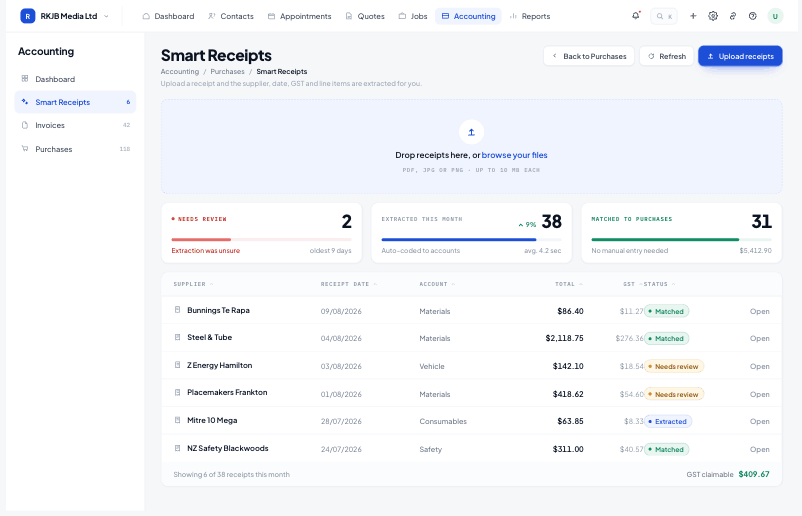
A photo from the ute, a PDF from the supplier, or a whole batch at once. The extraction runs as they land.
Each line carries its GST treatment, so the return is built from what actually happened, not a reconstruction.
Purchase allocation splits a single supplier bill across the jobs it covers, which is where job profit becomes real.
The extraction metrics above the table show how many receipts were read, how many needed a hand, and what is still waiting, so nobody has to open twenty records to find the one with a problem.
A merchant bill rarely belongs to one job. Purchase allocation lets you split lines across jobs, so materials variance reports against the estimate that was actually quoted.
The financial reports read from the same coded lines: cash position and movement, GST period totals for filing, and postings by account.
No. Systemise runs the job side and codes the spend; Xero stays the accounting ledger. The two stay in step so nothing is entered twice.
Common supplier formats read cleanly. Anything the extraction is unsure of is flagged in the table with the original document attached, so it takes seconds to correct.
Yes. Purchase allocation splits a bill by line or by amount across as many jobs as it covers.
GST is applied per line at NZ rates and totalled per period in the GST return report, ready for filing.
Start free for 14 days. Bring one live job across and see what it actually made.