
Four views, one truth
Switch between Gantt, resource, calendar and list without leaving the page. Blocks are sized to real duration, not to a tidy grid.
Jobs and scheduling
One schedule behind four views. Drag unscheduled work onto a crew, size blocks to real duration, and watch quoted value against recorded cost on every job.
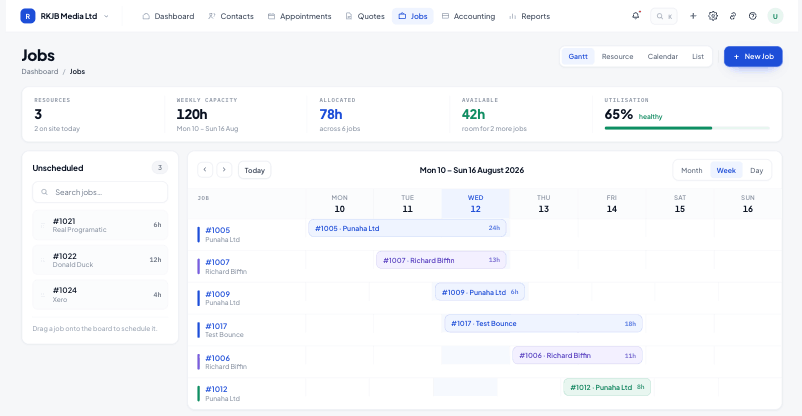
Switch between Gantt, resource, calendar and list without leaving the page. Blocks are sized to real duration, not to a tidy grid.
Block colour tells you who is on the work, and turns green once it is complete, so capacity reads at a glance.
Labour, materials and purchases post against the job, so the P&L card is current instead of arriving at year end.
The capacity strip shows how loaded each day is before you commit. Unscheduled jobs sit in a panel on the left; drag one onto a crew and the block sizes itself to the estimated hours.
Open a job and the four cards across the top answer the questions people actually ask: where is it up to, who is it for, what has it cost, and when is the crew on it.
Site notes, photos and hours logged on the job flow straight back to the office view, so nobody rings to ask what happened on Tuesday.
Yes. Resource view stacks every block a person is on, and the capacity strip warns you before a day is overcommitted.
Both. A charge-up job accrues labour and materials against an estimate; a fixed-price job measures the same costs against the quoted value.
The P&L card moves into a red loss state as soon as recorded cost passes quoted value, and the variance shows on the job list.
Subcontractors are resources like any other, with their own colour on the board and their own utilisation in reports.
Start free for 14 days. Bring one live job across and see what it actually made.