Before
Quotes re-typed twice
Once to price it, again to invoice it. Every re-key is a chance to lose margin.
Built for trades & services
Systemise runs quoting, scheduling, contacts, receipts and invoicing for trade and service businesses, so the office stops re-typing the same job into five different places.
14-day trial · no card · connects to Xero
 ⌘K Search
Modules, one job record
Custom reports you build and save
Contacts, suppliers and your account codes
Free, no card required
Plan inclusions and trial terms are set out in full on the pricing page.
The problem
A quote in a spreadsheet, the schedule on a whiteboard, receipts in the ute, invoices in the accounting package. Nothing reconciles, and nobody knows what a job actually made.
Before
Once to price it, again to invoice it. Every re-key is a chance to lose margin.
Before
Quotes sit unanswered for three weeks because nothing is tracking the days since contact.
Before
The loss shows up at year end, long after the crew moved on to the next site.
The workspace
A lead becomes a quote, the quote becomes a job, and the job becomes an invoice, carrying its client, site, line items and costs the whole way.
Build a priced quote from your own rates, send a branded PDF, and watch every status from sent to accepted, with follow-ups that surface themselves.
Explore quoting →02Four views over one schedule (Gantt, resource, calendar and list), with unscheduled work in a panel you drag from, and profit tracked per job.
Explore jobs & scheduling →03Clients, prospects and suppliers in one list, each with their account details and the full history of quotes, jobs and conversations.
Explore contacts & crm →04A booking form beside the week calendar: take the details while the client is still on the phone and save straight onto the schedule.
Explore appointments & bookings →05Drop a supplier receipt in and Smart Receipts reads the supplier, date, GST and line items, then allocates the spend to the job it belongs to.
Explore accounting & smart receipts →06Invoice straight from the job or the accepted quote, then watch what has been paid and what is ageing, without opening the accounting package.
Explore invoicing & payments →07Reports across revenue, leads, quotes, jobs, profitability, labour and cash. Build and save your own in Report Studio, or ask the assistant in plain words.
Explore reports & ai assistant →08Connect Xero once, code to the accounts you already have, and keep one contact and supplier list across both systems.
Explore integrations →The flow
The contact is created with its source, so you can see later which channels are worth the spend.
Priced from your rate book, sent as a branded PDF, tracked from sent to accepted.
The accepted quote becomes a job, dragged onto the crew's week with its line items intact.
Costs post against the job as it runs, the invoice draws from it, and the margin is known.
Xero
Connect Xero once and code to the chart of accounts you already have. Contacts and suppliers stay in step across both systems, so the same client is not typed in twice under two slightly different names, and a receipt coded in Systemise keeps its accounting context against the job it belongs to.
See how the sync works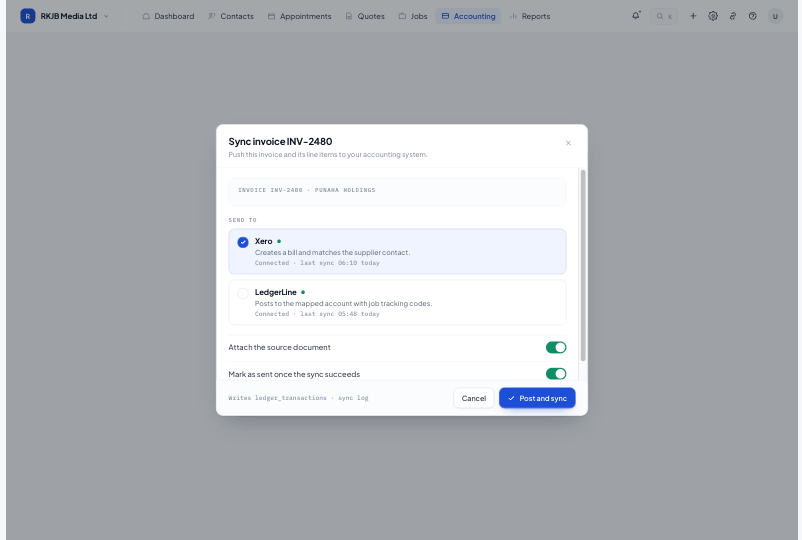
Trade and service businesses in New Zealand: roofing, electrical, plumbing and gas, building, painting, landscaping, HVAC and civil. Anywhere the work is quoted, scheduled, done on site and invoiced.
No. Systemise runs the job side and connects to Xero, which stays the ledger. Contacts and suppliers sync between the two, and coding uses the chart of accounts you already have in Xero, so the same records are not set up twice.
Most teams import contacts, set up their rate book and send a live quote in the first week. Bringing historic jobs across is optional and can happen later.
Yes. The Systemise app for iPhone, iPad, Android phones and tablets arrives on the App Store and Google Play on 15 November 2026, alongside the new version of Systemise, and the browser version works on a tablet too. On site the crew can open the day's schedule, read a job and its files, log time and materials, take job photos, capture a contact from a business card, fill in safety forms and have the customer sign the job off. Anyone whose role allows it can build a quote on site, send it, mark it accepted or turn it into a job. The app keeps working without signal and syncs when the device is back online.
Three plans, priced per user per month in NZD, from $39. Every plan includes quoting, contacts, bookings and the Xero connection. Prices exclude GST.
Start free for 14 days. Bring one live job across and see what it actually made.