
One screen, no tabbing
The form panel and the week sit side by side, so nobody has to hold a date in their head while they find a gap.
Appointments and bookings
The booking form sits beside the week calendar. Pick the client, the site, the day and the window, and save, and the booking lands on the schedule everyone else is looking at.
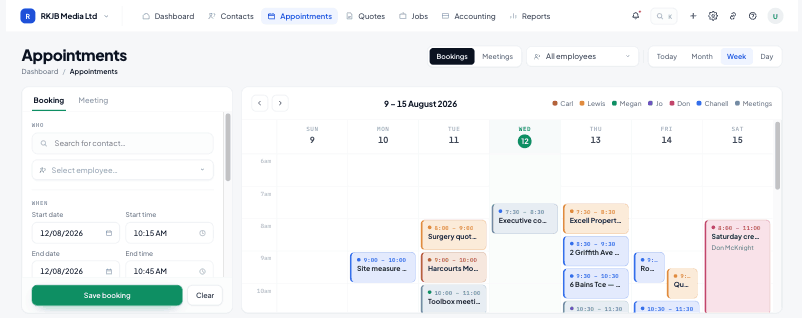
The form panel and the week sit side by side, so nobody has to hold a date in their head while they find a gap.
The week shows jobs and bookings together, so the gap you are offering is a gap that actually exists.
Saving a booking confirms it: the green save is the last step, and the client gets the confirmation.
Client, site, contact person, work type, duration and notes. Fields name the thing, not the action, and the sticky save bar stays in reach on long forms.
Half-hour rows, today tinted blue, and blocks coloured by resource. Move a booking and everyone from the office to the van sees the change immediately.
When the visit becomes a job, the booking's client, site and notes carry across: the quote or job starts with the details already in it.
Bookings are taken by the office today. Availability is read from the same schedule the crew works to, so what you offer is always current.
Yes. Bookings and jobs sit on the same week, so a day's real load is visible in one place.
A booking can repeat on a set interval, and each occurrence lands on the calendar as its own block.
A confirmation with the date, the window, the site and who is coming, sent as the booking saves.
Start free for 14 days. Bring one live job across and see what it actually made.