
Real rates, real margin
Materials, labour and markup come from your price list, so the total is right before it leaves the office.
Quoting
Price the job once, from your own materials and labour rates. Send it as a branded PDF, track the status on the list, and convert the accepted ones straight into work.
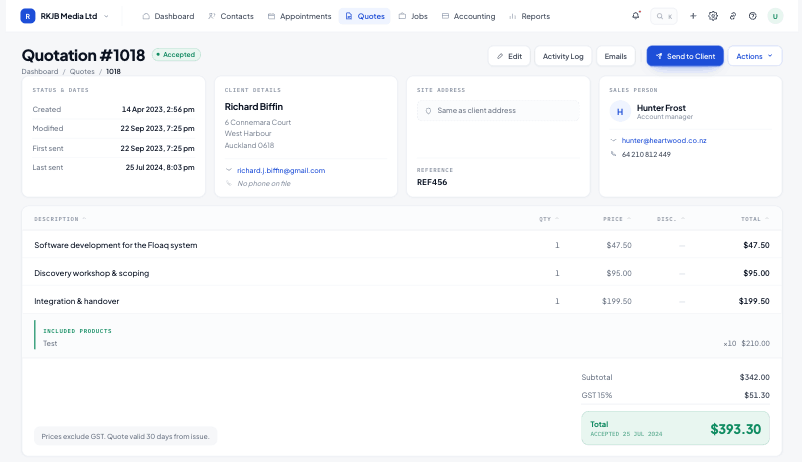
Materials, labour and markup come from your price list, so the total is right before it leaves the office.
The list filters by status with a live count beside each one. Nothing sits in an inbox waiting to be remembered.
Quotes past their follow-up window move into their own filter, with days since last contact on the row.
Repeatable line-item blocks let you group by area, stage or trade. Each line carries quantity, rate, markup and GST treatment, and the totals panel recalculates as you type.
The quote detail carries the client, the site address, the reference and the full activity trail, so anyone in the office can pick it up mid-conversation.
Converting carries the line items into the job budget, so the quoted value becomes the baseline every cost is measured against for the rest of the job.
Yes. Systemise runs in the browser on a phone or tablet, so a quote can be priced, previewed and sent before you leave the driveway.
GST is applied per line and shown in the totals panel, with the standard qualifying line (prices exclude GST, quote valid 30 days from issue) carried on the PDF.
The quote PDF carries your logo, company details and payment terms. Layout and the qualifying copy are set once in settings and applied to everything you send.
The quote moves to accepted, its value lands in the accepted-value total on the list footer, and the Actions menu offers Convert to job, carrying the line items into the job budget.
Start free for 14 days. Bring one live job across and see what it actually made.