
Fewer people are coming into the trades, and the ones who are here are newer. The number of new apprentices starting this year fell by 27 percent on 2025, a year in which the intake had already halved. Fewer than one in five plumbing businesses took on an apprentice at all, and across construction as a whole the figure sits between 10 and 15 percent. Infometrics puts the shortfall at around 1,450 plumbing, gasfitting and drainlaying roles to be filled in the coming year, against a qualification that takes five years to complete. RNZ has the detail.
At the same time, the Electrical Workers Registration Board published an updated supervision companion guide on 10 August 2026, alongside amended Rules of the Board covering supervision and Limited Certificates.
Together they point to a practical shift on site: more of the people doing the work are operating under someone else's authority, and the business has to be deliberate about what each of them can do.
A clarification before we go further. Supervision in the regulatory sense belongs to the EWRB, and the records that evidence it live with the Board, not in your job system. Systemise does not hold Limited Certificate data, does not record supervision, and is not evidence of compliance with any licensing regime. What it does answer is the operational question sitting right next to that one: inside your own business, who can see what, and who can change what.
The awkward part is the money
Most access questions in a trade business are easy. Everyone needs to see the address. Everyone needs to see what the job is.
The difficult one is cost and margin. A job's financial position is among the most sensitive information a trade business holds: it is what you charge, what the work costs you, and the gap between the two. There are good reasons for a foreman to see it and good reasons for a first-year apprentice not to, and "we all just use the same login" stops being a workable answer the moment the crew grows past the people you would tell anything to.
Roles you name, grants that do the work
Roles in Systemise are defined by your company and named however you like. Some businesses have an Owner, a Manager, a Scheduler and Field. Others have Dispatch, or The Office, or names that only make sense inside that business.
So what a person can do is not worked out from the name of their role. It is worked out from the role's authorisation grid: a set of resource-and-verb pairs the office configures. booking:create is permission to book work in. contact:create is permission to add a customer. timesheet:update is permission to alter recorded hours. A role holds a grant or it does not.
A check written against role names works until a company renames a role, and then it quietly stops working. Deriving behaviour from the grid means a business can call its roles anything at all and the permissions still hold.
Whether prices, costs and margin appear on the phone at all comes from read access to quotes, invoices or purchases. Hold none of those three and the money is not shown.
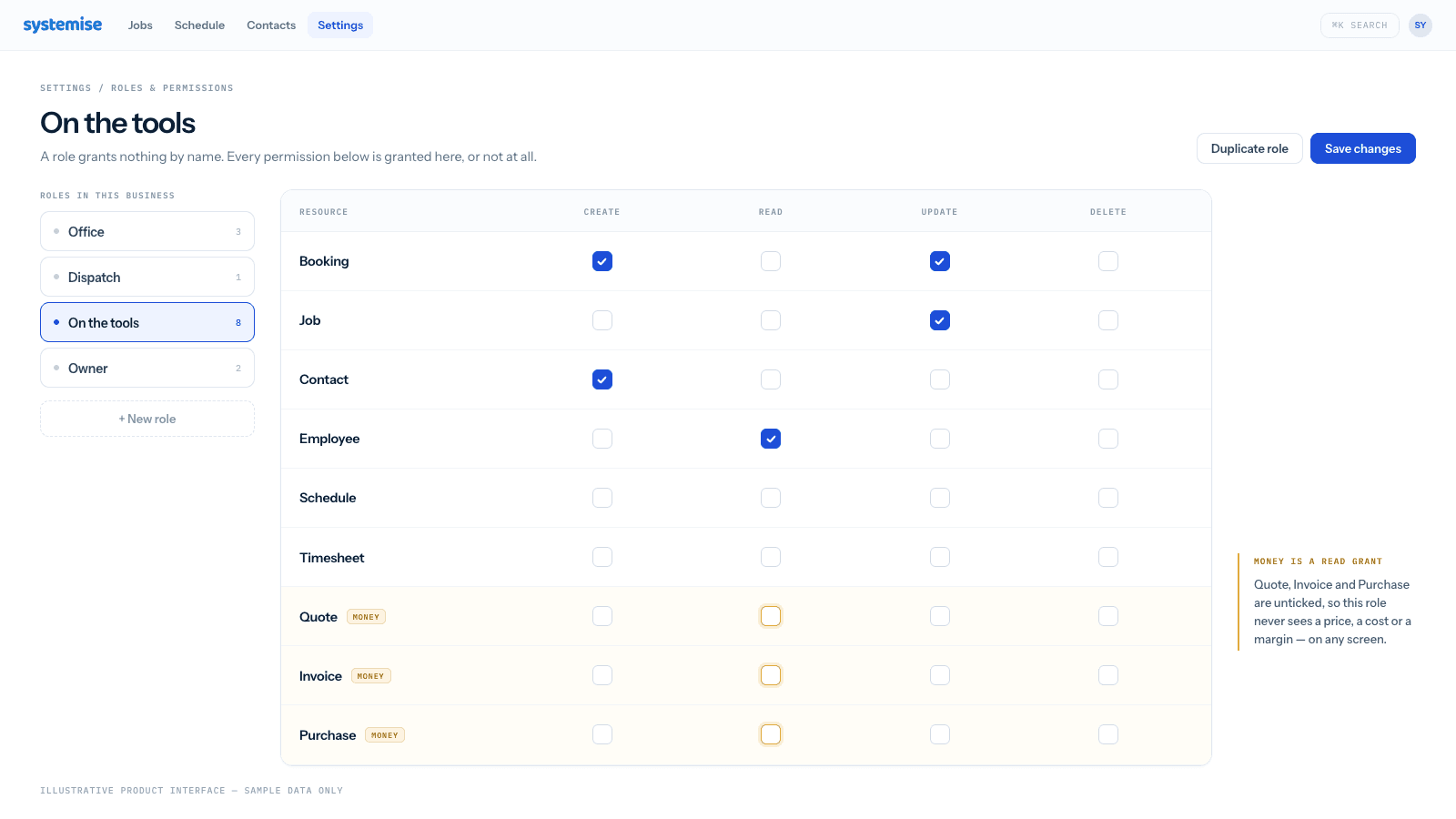
The default is closed
One design decision runs the other way from how a lot of software behaves.
If a role arrives with no grid recorded against it at all, Systemise treats that person as crew on the tools, not as an administrator. The comment sitting in the code is blunt about why: falling back to the permissive side would leak margin to the tools, and that is the one thing the design is emphatic about.
A misconfiguration should cost someone a button. It should not hand them the numbers.
Missing a grant removes the control, not just the outcome
When someone lacks a permission, the point is not to let them try and then refuse them.
A role without contact:create gets the customer search and no "add new" button. A role that can schedule but cannot read employees gets no crew picker at all, rather than a picker that fails the moment it is used. On bookings, the app also declines on the form itself: a booking with nobody assigned is stopped before it is queued, rather than sent away to fail somewhere the crew never sees it.
The interface reflects what you can actually do, so nobody learns their permissions by hitting errors.
The server does not take the phone's word for it
This is the part that matters most.
The app works out what to show. The server decides what it will return, and it decides independently.
Bookings narrow twice on the way out. First by scope: unless a person is entitled to see all work, the query returns only bookings belonging to the employees they may see, and if that list is empty it returns nothing rather than everything. Then per record: viewing, changing and deleting a booking each require the grant and that the booking is assigned to that person.
The reason is recorded in the code. The query that fetches a day's bookings takes a "mine only" argument, and it trusts it. The phone sets that argument from the person's own capabilities, but anything else holding a valid token could simply decline to set it and ask for the whole company's day. The scope exists so the answer does not depend on the caller behaving itself.
A permission model that only runs in the app is a suggestion. This one runs on the server too.
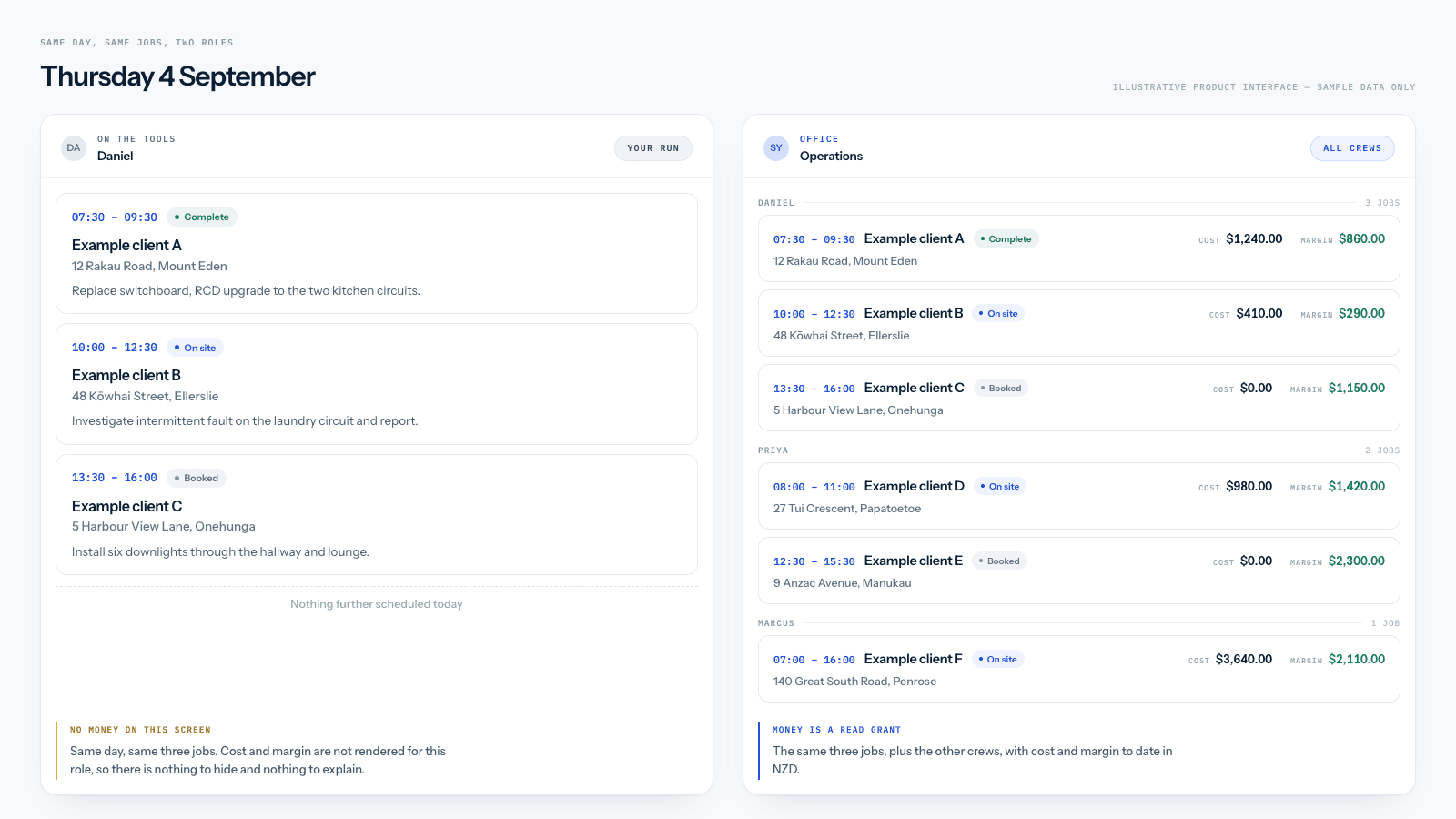
Finished jobs change hands
While a job is open, the crew can add and amend their own time.
Once it is finished, that changes. The hours on a completed job are what the customer was billed against and what the pay run was built from, so revising them becomes an office permission, timesheet:update, rather than a crew one.
Two deliberate exceptions. Adding time to a finished job is not blocked, because a return visit is still the same job and recording that work anywhere else would move the cost off the job it belongs to. And whoever wrote a line keeps a short window to remove their own entry, because the common case is a mistake noticed immediately.
What happens when permissions change and the phone is in a basement
Most job systems do not have to think about this one. Systemise does, because the field app holds a local copy of the records a crew member needs so it keeps working without coverage.
If the office narrows a role's permissions, every phone in that role is potentially holding records it should no longer display.
Systemise handles this by recording, alongside the offline copy, a stable summary of what that role may read. When the app next checks, it compares that summary rather than the role's identifier. The distinction is the whole point: the office can edit a role's grid without moving a single person between roles, and comparing role identifiers would miss that entirely. Comparing what the role may read catches it.
The summary deliberately covers read permissions only, not write permissions and not labels. There is a practical reason, learned the hard way during development: adding a write permission to that summary changes every phone's recorded scope on the day it ships, and each device then wipes and re-downloads its local copy, taking any queued writes with it. A crew member's unsent timesheet is not an acceptable price for tracking a permission that never governed what they could see.
One more constraint shapes the design. The secure storage on a phone refuses values much above 2 KB, and a full permission grid runs to about 5 KB. So the grid itself is not kept on the device. The derived flags are.
More than one company
For businesses running a trading entity and a second brand, or several companies under one roof, every record belongs to exactly one company workspace, and access is controlled by role within it. Multi-company workspaces sit on the Business plan.
What this does not do
The market context at the top of this article can suggest more than Systemise actually does.
Systemise records worked time against jobs. It is not a payroll system, does not calculate leave or pay, and does not evidence supervision or hold licensing records. Permissions here govern your own business's data: who sees the margin, who moves the work, who corrects the hours after a job closes. Regulatory obligations sit with the relevant Board and the records that satisfy them live there.
Nor does the software decide who should see what. That judgement is yours. What it does is make the judgement enforceable once you have made it.
A practical way to set it up
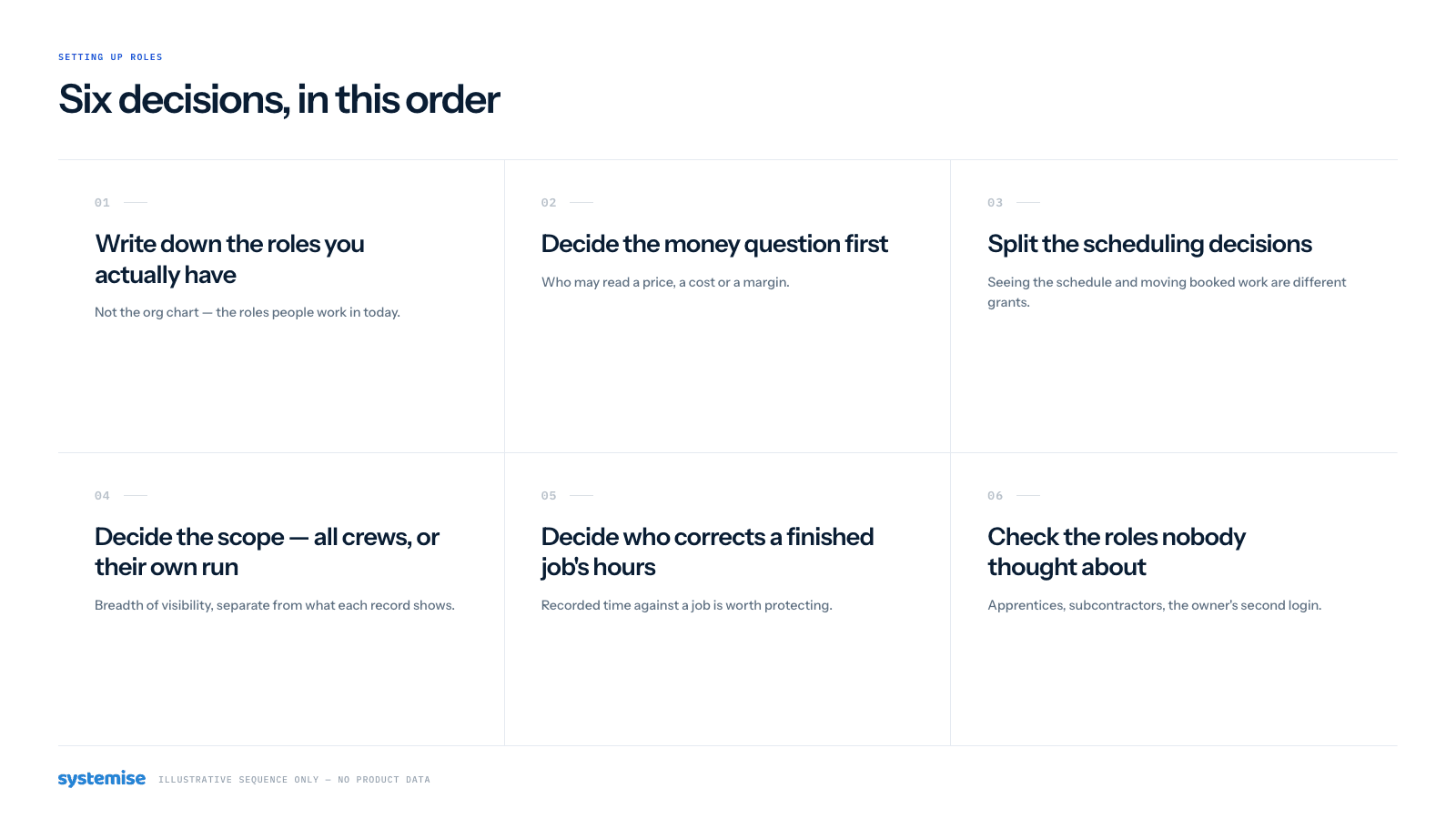
If you are configuring this for the first time, work through it in this order rather than starting from the grid:
- Write down the roles you actually have, using the names your business already uses. Not the names the software suggests.
- Decide the money question first, one role at a time. Should this role see prices, costs and margin? It is the decision everything else is easier after.
- Split the scheduling decisions. Can they book new work in? Move their own bookings? Move a job's segment across the week? Three separate answers.
- Decide the scope. Does this role see the whole crew's day, or only their own run?
- Decide who corrects a finished job's hours, and keep that list short.
- Check the roles nobody thought about. A role with an empty grid is treated as crew, which is the safe direction, but it is better to be deliberate than to rely on the default.
Then give one person each role for a day and ask them what they could not do that they needed to. That surfaces the gaps faster than reading the grid ever will.
Where to look next
Permissions touch most of the product, so the practical detail sits with the areas they govern: Jobs and scheduling for the job board and its views, Appointments and bookings for how work reaches the schedule, and Reports for what different roles can pull out. If your question is about where the data lives and who else touches it, that is on the Security page.
If you would like to walk through how your roles would map onto the grid, book a walkthrough and bring the awkward one: the role you are not sure about is usually the one worth designing around.